DupScout Logo

Search Duplicate Files in Multiple Disks or Directories

DupScout is capable of searching duplicate files in a number of disks, directories or network shares. In order to detect duplicate files in multiple locations, open the duplicate files search profile dialog and specify all the disks, directories and/or network shares that should be processed.
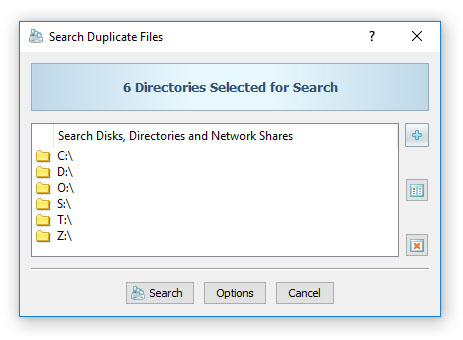
Search Duplicate Files in Multiple Disks

By default, DupScout will process all the specified locations sequentially, one after one. When processing directories located on different physical disks or different computers, it may be more effective to process all the specified locations simultaneously.
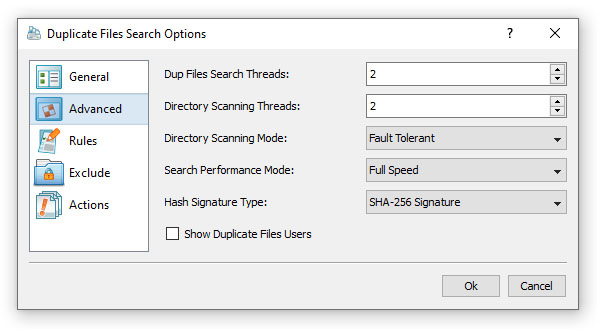
Duplicate Files Search Advanced Options

In order to process all the specified locations in parallel, open the duplicate files search options dialog, select the 'Advanced' tab and specify the number of parallel processing threads for the duplicate files search operation.

DupScout News

30-Sep-2026

DupScout v18.3 adds the ability to load lists of directories to search duplicate files in from text files allowing one to automate the duplicate files search operations. In addition, the new product version improves the conditional duplicate files search actions allowing one to automatically generate duplicate files search reports according to the user-specified conditions, improves the DupScout Server GUI application and fixes a number of bugs.

3-Jun-2026

DupScout v18.2 improves the performance and the fault tolerance of the duplicate files search operations and improves the duplicate files search progress dialog. In addition, the new product version improves support for Unicode characters in file search rules and regular expressions, improves the main DupScout GUI application and fixes a number of bugs.

More News